Golf guide
Keep golf score from the course. Family and friends watch live.
Walking the course with your player, or playing it yourself? Enter par and strokes after each hole. Grandparents, parents at work and anyone who couldn't make it follow the round hole by hole from one link, with nothing to install.
No account needed. Set up a round in about 30 seconds.
In 30 seconds
On the first tee with no time to read? This is all you need.
- Pick golf, name the player Tap Create an event, then Golf. Type a first name or nickname, pick 18 holes or 9 holes and tap Save & get the link.
- Text the link to family Text the link opens your phone's share sheet with the message ready. Send it to the family group chat.
- Enter each hole After each hole, tap Enter hole 1 (and so on), pick par and the strokes, and save. Then the phone goes back in your pocket.
Step by step
From setup to the final score, in the order you'll meet each screen. Words in bold are exactly what the buttons say.
-
Set up the round
Open gamedayscore.live and tap Create an event, then Golf. Type the player's first name or nickname: it shows at the top of the live page, so a first name is enough.
Pick 18 holes or 9 holes. Starting on the back nine or a shotgun start? Set the Starting hole with − and +, or tap Hole 10; the card stays in hole order. Add a Match line if you like, such as the opponent or the course. Then tap Save & get the link.
You don't need to know the course: you enter par for each hole as you go. Setting up needs a signal, so do it at the clubhouse; scoring works without one.

Setup: player, holes, starting hole -
Share the link
Text the link opens your phone's share sheet with the message already written. Pick the family group chat and send. Copy puts the link on your clipboard, and the QR code button next to Text the link shows a code that people near you can scan.
Follow Tessa’s round live, hole by hole. Keep this open, it updates on its own: gamedayscore.live/e/7QK4M2XT
Further down is Copy my scorer link. That one is for you only: it's how you carry on from another phone. Then tap Start scoring.
“Anyone with this link can change the score. Send it only to yourself.” Family gets the live page link, never the scorer link.
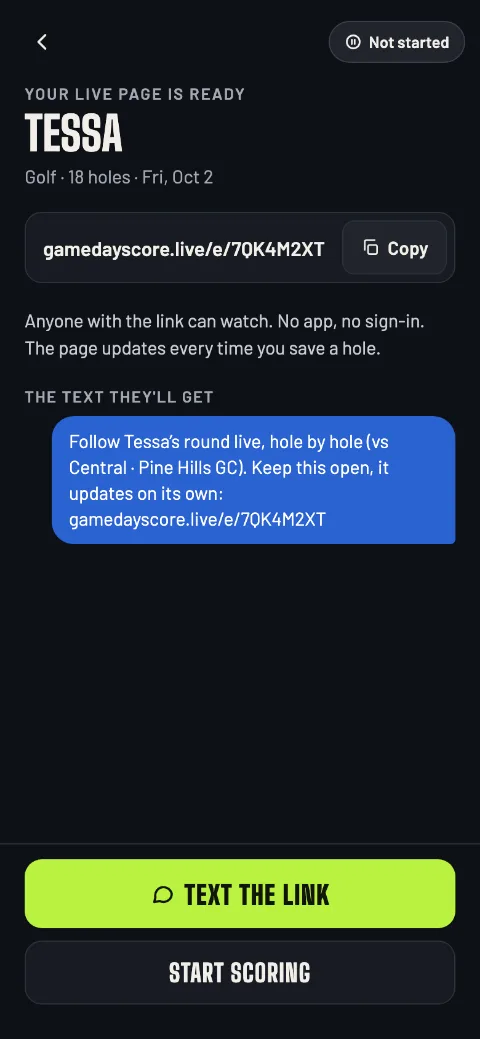
Share: the message family gets -
Tee off
The scorecard opens with Tee off at the bottom. Tap it when the round starts, and the live page shows the player on the first hole. Saving a hole starts the round too.
The screen doesn't stay on for golf, so the phone can go in your pocket between holes.
-
Enter each hole
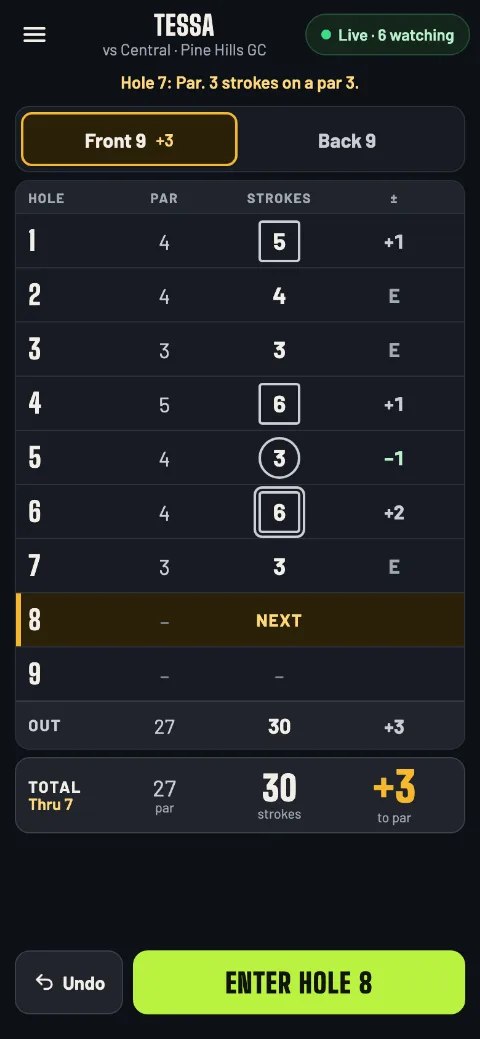
After the hole, tap Enter hole 8 (or tap the hole's row on the card). Pick Par, 3, 4 or 5, from the scorecard or the tee sign, then the Strokes; 10+ goes up to 20.
The sheet names the result, like “Bogey · +1”, and shows where that leaves the round: “After this hole: +3 thru 8”. Tap Save hole 8.
On the card, a circle marks a hole under par and a square a hole over par. The total row keeps par, strokes and the score to par.
The card, hole 8 next 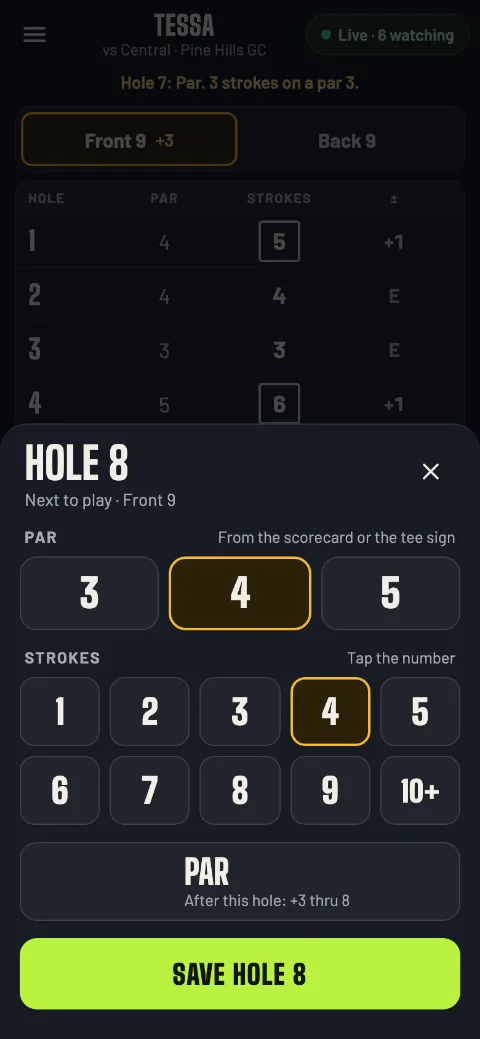
Par, then strokes -
Fix a hole
Tap any hole you've entered. The sheet reads Fix this hole and shows what it was; change it and tap Save changes, or Clear this hole to blank it.
Undo steps back your last change, one at a time, while the round is going. The live page follows every fix and says Score corrected with what changed.
Fix Tap the hole, change par or strokesUndo Your last change, while the round is going -
Missed a hole?
Keep going and fill it in later: holes can be entered in any order. A skipped hole reads Not entered on the card and isn't counted in the score until you add it.
Family sees “Holes 5–7 not entered yet.” When you fill them in, their page says “Caught up at 11:05 AM: holes 5–7 added.” Once you reach the last hole, the button reads Enter hole 5 for the first one still blank.
-
No signal on the course
Keep entering holes. Every hole is saved on your phone first, and the pill at the top counts what's waiting, like Offline · 3 to send. Your holes go out by themselves, in order, as soon as there's a signal.
Golf's live page never marks the round as late. It says when the last hole came in, like “Hole 7 entered at 10:42 AM”, so a phone in a pocket between holes looks just as it should.
Anything still waiting when you close the app is sent the next time you open it.
Handing scoring to someone else? They open your scorer link on their phone and carry on. Let your phone send everything first: holes a phone never sent are dropped when the other phone takes over.
-
Finish the round
When the last hole is in, the app asks Finish round?: “Check the card matches the official scorecard, then finish. You can still fix a hole after.” Tap Finish round, or Not yet.
The final screen shows the strokes, the score to par and the card. Text the final score sends the recap, and Copy copies it:
Final: Tessa 76 (+4) · vs Central · Pine Hills GC
New round sets up the next one for the same player and holes. Back to home goes to your list.
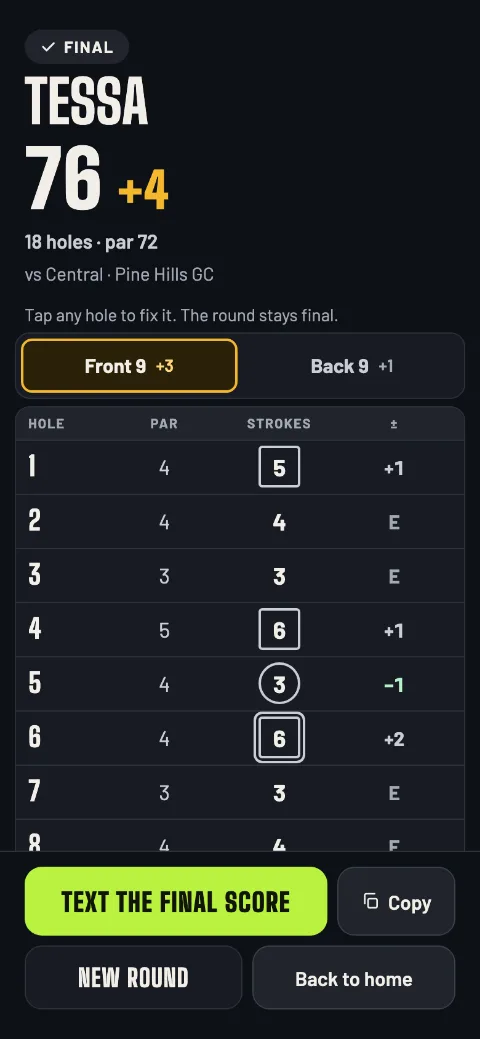
The final round -
Ending early
Weather, a withdrawal or a round cut short? Open the menu and tap End round early (it works once a hole is in). The app asks End round early? and End round makes it final, “Final · thru 14”. The holes not played stay blank.
-
Fix the card after the round
On the final screen, “Tap any hole to fix it. The round stays final.” Change a hole, add a missing one, or clear one, and the total and the recap follow.
The live page shows Score corrected with the change, and when the round ended: “Round ended at 1:02 PM · corrected at 1:20 PM”.
For Grandma
What your family sees
They tap the link and the live page opens in their phone's browser. No app, no sign-in, no refreshing: the card fills in by itself after each hole.
-
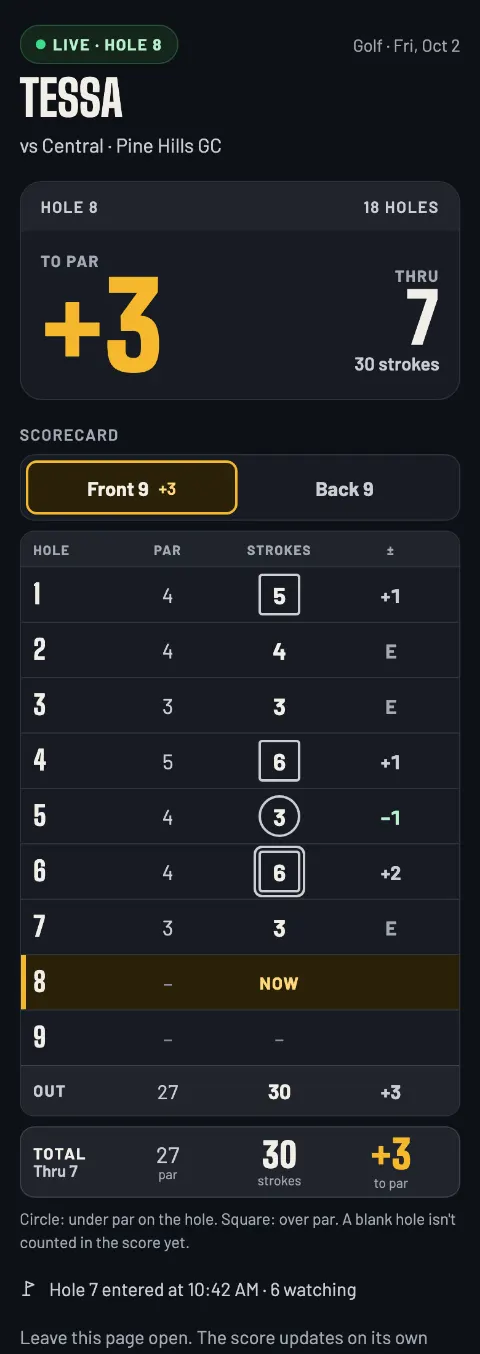
Live
The hole the player is on, the score to par, thru and strokes, and the scorecard. “Hole 7 entered at 10:42 AM · 6 watching” says when the last hole came in.
-
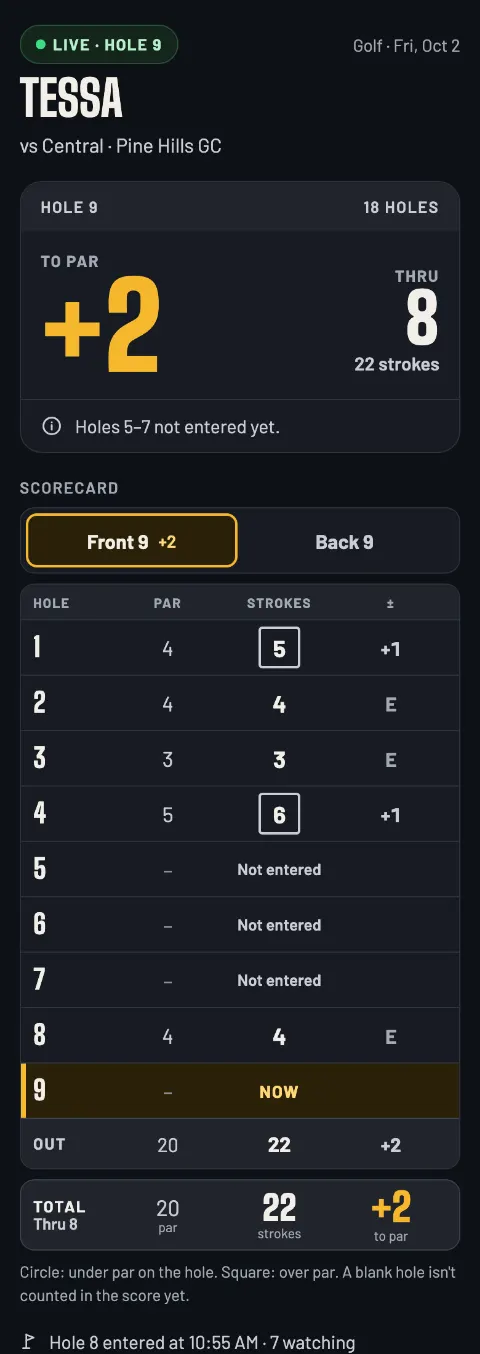
Holes not entered
A skipped hole shows as Not entered and doesn't count yet. When you fill it in, the page says the holes were caught up.
-
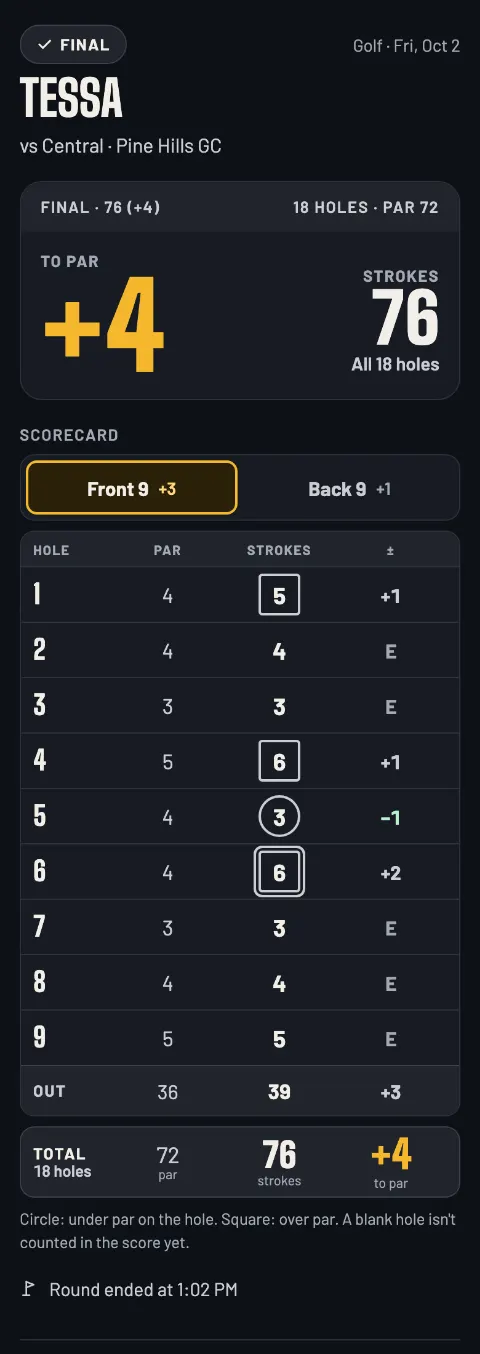
Final
The total, the score to par, the whole card and when the round ended. The link keeps working after the round, so latecomers still see the result.
After a fix, a note reads Score corrected at 1:20 PM. with what changed, like “The scorer fixed hole 6 after the round: 5 strokes (was 6).”
The rules the app follows
Exactly how the app scores a round, and what it doesn't do yet.
How it scores
- Stroke play, one player. The score is the strokes and the score to par over the holes entered.
- Par 3, 4 or 5 and 1 to 20 strokes for each hole, entered as you go.
- 9 or 18 holes, from any starting hole. The card stays in hole order.
- A blank hole isn't counted. Holes can be entered in any order, before and after the final.
- The round ends when you say so: Finish round once every hole is in, or End round early after the first hole.
Not in golf yet
- More than one player on a card. Each round is one player's.
- Match play, Stableford points, handicaps or net scores.
- Putts, fairways and other stats.
Questions parents ask
Does my family need an app or an account?
No. They tap the link and the live page opens in their phone's browser: no app, no sign-in. You don't need an account to keep score either. Your rounds are saved on your phone.
Can I keep score of my own round?
Yes. Put your own name in as the player and enter your holes as you play; family follows your round the same way. The live page says it's kept live from the course.
Do I need to know the course's par?
No. You pick par for each hole as you enter it, from the scorecard or the tee sign.
We start on hole 10. Does that work?
Yes. Set the Starting hole at setup (Hole 10 is one tap). The app plays the holes from there and wraps round, and the card stays in hole order.
What if I lose signal on the course?
Keep entering holes. Each one is saved on your phone and sent as soon as there's a signal; the pill shows how many are waiting, like Offline · 3 to send. Family sees when the last hole came in, and the card catches up.
I forgot to enter a hole. Can I add it later?
Yes, any time, even after the round is final: tap the hole on the card and save it. Until then it reads Not entered and isn't counted in the score.
Can someone else take over scoring?
Yes, with your scorer link (Copy my scorer link on the Share screen). They open it on their phone with a signal and carry on, and your phone shows Scoring moved to another phone. Send it only to the person taking over: anyone with it can change the score.
How long does the live page stay up, and can I delete it?
Until 30 days after the last change to the score; a round nobody scored is removed after 48 hours. You can delete it any time you have a signal: Delete event in the menu, or the trash button on the round in your list on the app's home screen (that's how you delete a finished one). Then the link shows “This event isn't available.”
Score your next round.
Open it on your phone at the first tee. No account needed.
Start a golf round gamedayscore.liveGameDay also scores volleyball, football, soccer, basketball, baseball and softball, lacrosse and hockey.
Read the volleyball guide Read the football guide Read the soccer guide Read the basketball guide Read the baseball & softball guide Read the lacrosse guide Read the hockey guide Back to the home page