Baseball & softball guide
Keep baseball and softball score from the stands. Family and friends watch live.
For the parent with the phone at the game. Two buttons, Out and +1 Run, and the app keeps the innings, the outs and the line score. Grandparents, parents stuck at work and anyone who couldn't make it follow every run from one link, with nothing to install.
No account needed. Set up a game in about 30 seconds.
In 30 seconds
Reading this in the stands before the first pitch? This is all you need.
- Pick the sport, name the teams Tap Create an event, then Baseball / Softball. Type both team names and tap Save & get the link.
- Text the link to family Text the link opens your phone's share sheet with the message ready. Send it to the family group chat.
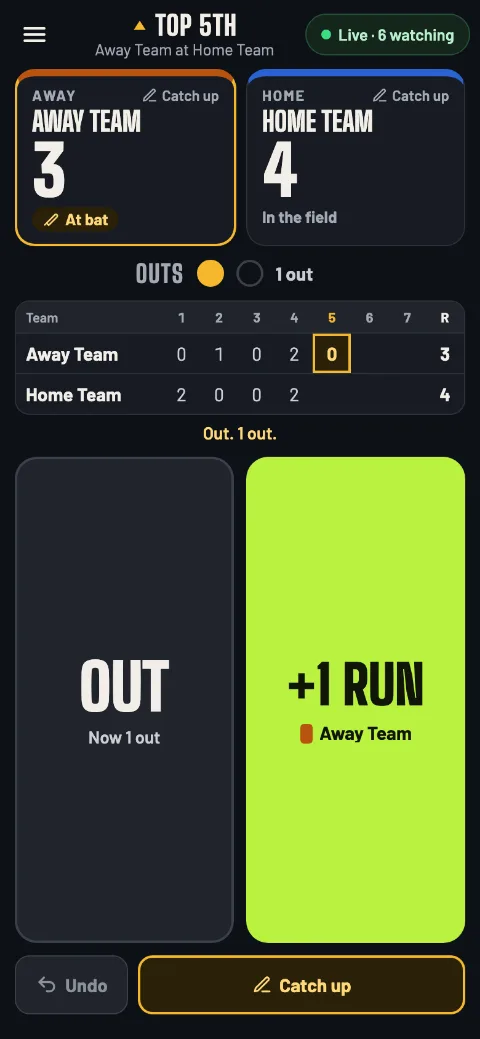
- Tap Out and +1 Run Out for every out, +1 Run for every run. The third out changes sides on its own.
Step by step
From setup to the final score, in the order you'll meet each screen. Words in bold are exactly what the buttons say.
-
Set up the game
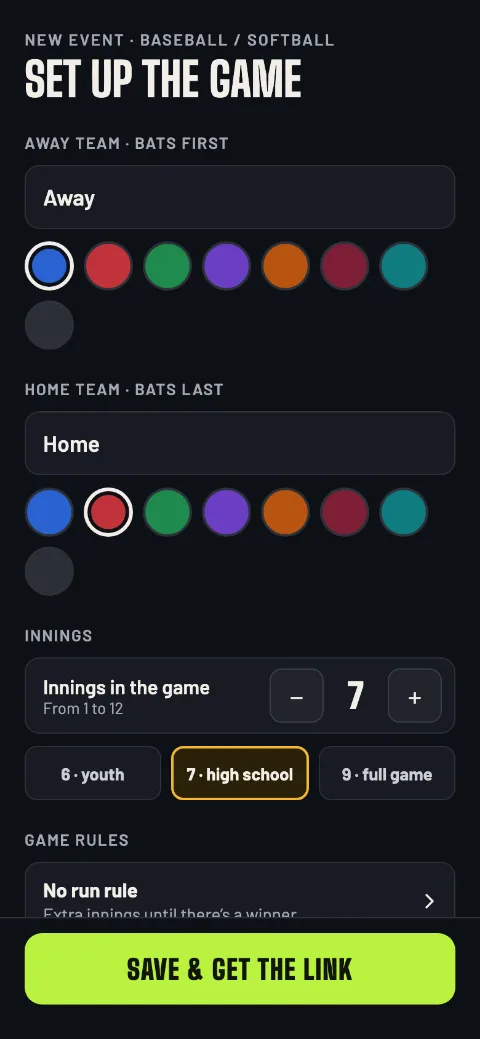
Open gamedayscore.live and tap Create an event, then Baseball / Softball. It's one sport for both: only the number of innings differs. Type the team names and pick a color for each: the away team bats first, the home team bats last.
Innings starts at 7; change it with − and + (1 to 12) or tap 6 · youth, 7 · high school or 9 · full game. Then tap Save & get the link.
Setting up needs a signal, so do it before you reach the bleachers if the field has a weak one. Scoring works without one.
Setup: teams, innings, game rules -
Match your league's rules
Before you save, tap Game rules. Turn on Run rule (mercy rule) and set Ahead by and After, or tap 15 after 3, 10 after 5 or 8 after 6.
Under If it's tied after 7 innings, pick Play until there's a winner, Stop after 1 extra inning (up to 9) or No extra innings. Tap Done to go back to setup.
When a rule ends the game, the app asks you to confirm first. It never ends a game on its own.
Run rule Off to start; 10 after 5 when you turn it onExtra innings Until there's a winner, up to a limit, or none -
Share the link
Text the link opens your phone's share sheet with the message already written. Pick the family group chat and send. Copy puts the link on your clipboard, and the QR code button next to Text the link shows a code that parents sitting near you can scan.
Live score for Away Team at Home Team baseball / softball. Keep this open, it updates on its own: gamedayscore.live/e/7QK4M2XT
Further down is Copy my scorer link. That one is for you only: it's how you carry on from another phone. Then tap Start scoring.
“Anyone with this link can change the score. Send it only to yourself.” Family gets the live page link, never the scorer link.
-
Outs and runs
There's no start button: the first out or run starts the game. Tap Out for each out and +1 Run each time a runner scores. The run goes to the team at bat, marked At bat; the other reads In the field.
The third out retires the side on its own: the top of the inning becomes the bottom, and the bottom becomes the next inning's top. The outs lights and the line score under the teams follow every tap, and the screen stays on while you score.
Out and +1 Run for the team at bat -
Fix a mistake
Undo steps back one tap at a time: an out, a run, a change of sides. Tap it again to keep going back.
Noticed a wrong number innings later? Use Catch up (step 7) to set the right runs for any half-inning. The live page follows every fix as soon as it's sent.
Undo The last thing you tapped, one at a timeCatch up Set the right runs for any half-inning -
Game over?
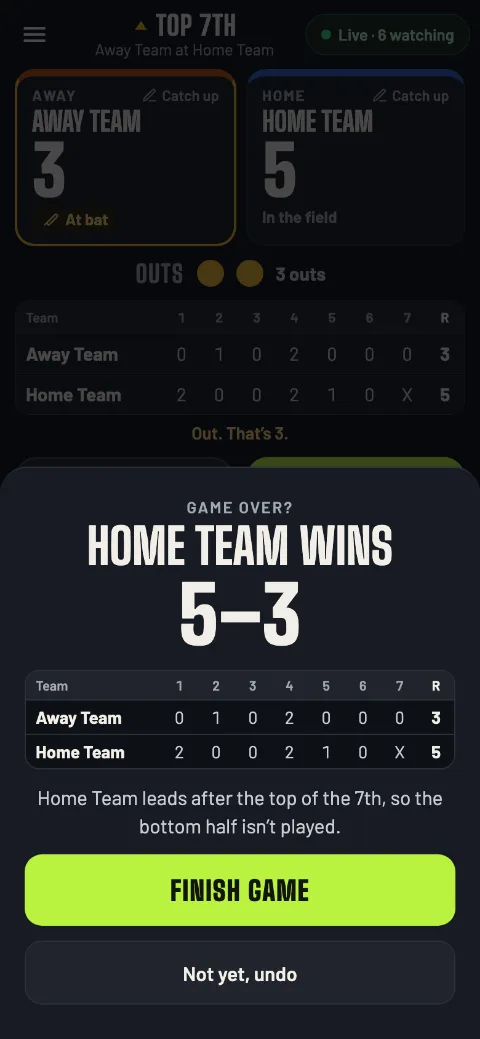
When the game can end, the app stops and asks Game over? with the reason: the home team leads after the top of the last inning, the last out of the last inning, a walk-off, the run rule, or a tie after the extra innings your setup allows.
Finish game makes it final (End as a tie on a tie). Not yet, undo takes back the out or run that brought it up.
Tied after the last inning and extra innings allowed? Nothing to tap: the third out takes the game into the next inning.
Game over? Confirm or not yet -
Joined late or missed a run?
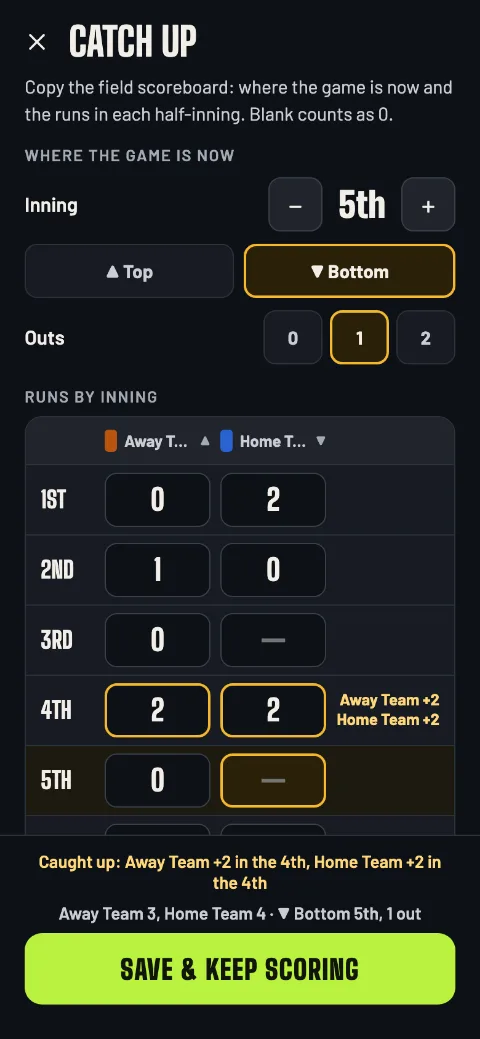
Tap Catch up (or either team, or Catch up / edit score in the menu). Copy the field scoreboard: under Where the game is now, set the Inning, ▲ Top or ▼ Bottom, and the Outs; under Runs by inning, each team's runs in each half-inning. Blank counts as 0. Then tap Save & keep scoring.
Family sees a “Caught up” note with the runs you added. If a number went down, the live page says Score corrected at 7:31 PM. instead.
Catch up, half-inning by half-inning -
No signal at the field
Keep tapping. Every out and run is saved on your phone first, and the pill at the top counts what's waiting, like Offline · 3 to send. Your taps go out by themselves, in order, as soon as there's a signal.
Meanwhile family's page reads Delayed after 2 minutes without news, then catches up when your taps arrive.
Leave the app open until the count is gone. Anything still waiting when you close it is sent the next time you open the app.
Handing the phone job to another parent? They open your scorer link on their phone and carry on. Let your phone send everything first: taps a phone never sent are dropped when the other phone takes over.
-
The final
The final screen shows the winner, how the game ended and the line score. When the bottom of the last inning wasn't played, its box shows an X.
Text the final score sends the recap, and Copy copies it:
Final: Home Team 5, Away Team 3 (7 inn.)
New match sets up the next game with the same teams and rules. Back to home goes to your list of games.
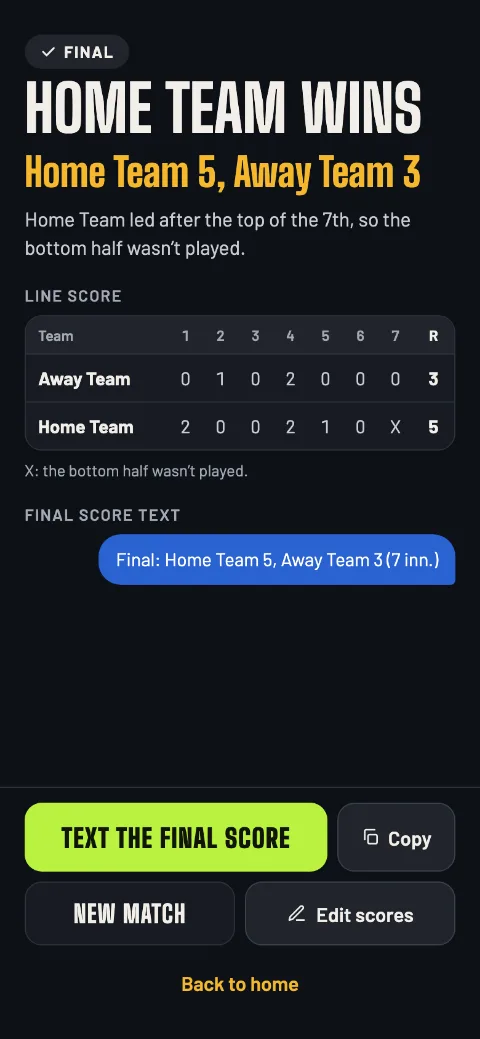
The final, with the X -
Fix the score after the game
Got an inning wrong? On the final screen, tap Edit scores, fix the runs in any half-inning and tap Save scores. The game stays final, and the result follows the new totals.
The live page shows the new final with “Score corrected”.
If the edit makes it a tie, the app asks first: Save as a tie or Keep editing. Extra innings can't be played after the game.
For Grandma
What your family sees
They tap the link and the live page opens in their phone's browser. No app, no sign-in, no refreshing: the score changes by itself.
-
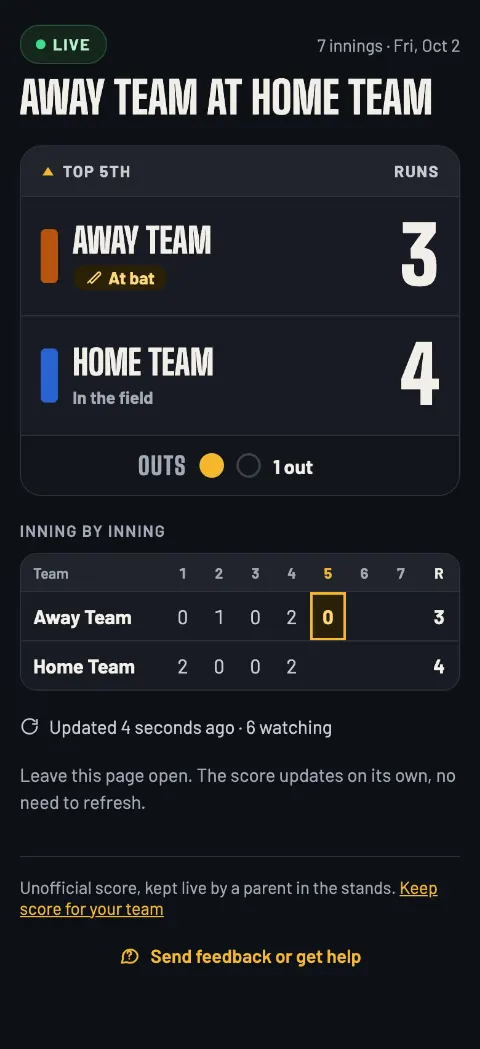
Live
The half-inning, the runs, who's at bat, the outs and the score inning by inning. “Updated 4 seconds ago · 6 watching” shows it's really live. If your phone loses signal for 2 minutes, the page says Delayed until you're back.
-
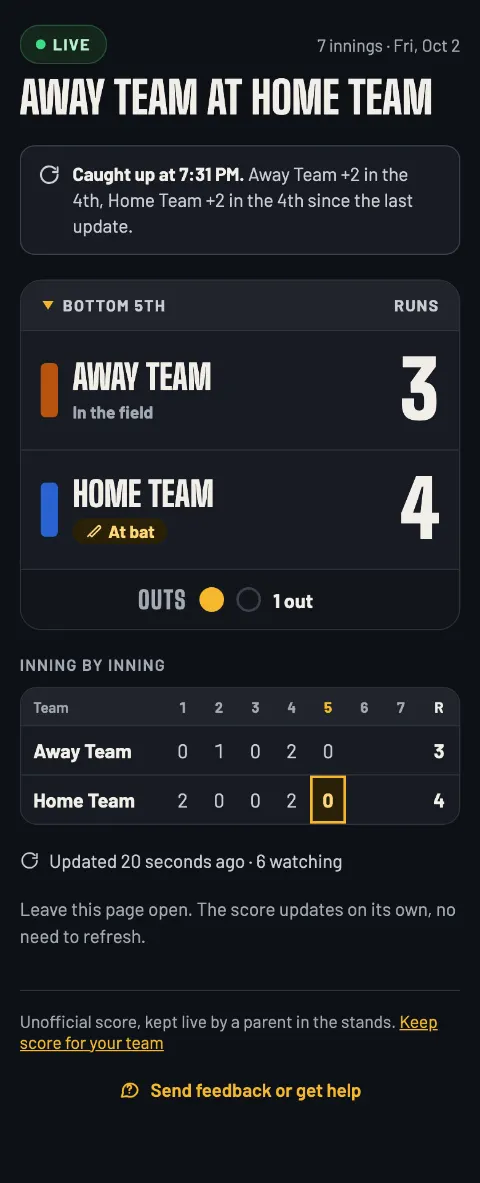
Caught up
After a catch up, a note says what you added, like “Caught up at 7:31 PM.”, so a jump in the score doesn't look like a glitch.
-
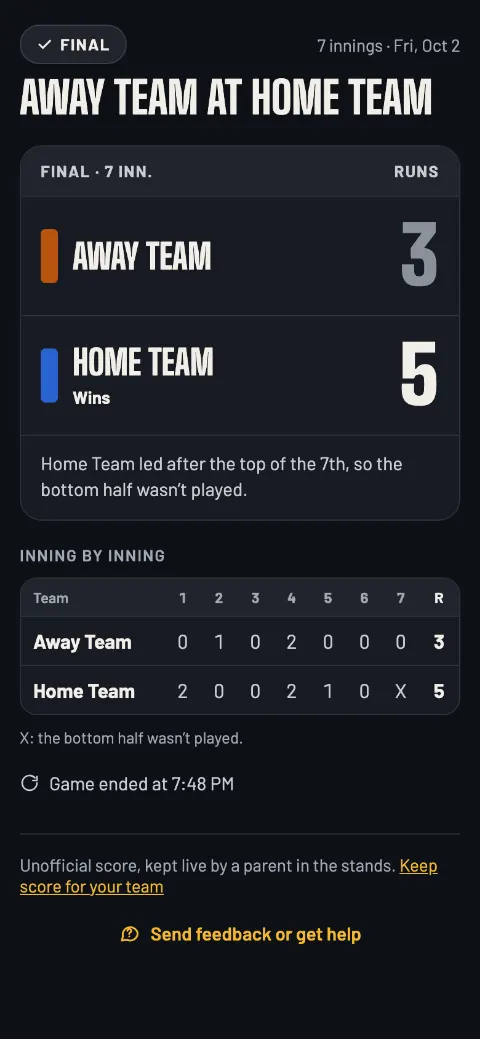
Final
The winner, how it ended, the line score and when the game ended. The link keeps working after the game, so latecomers still see the result.
After a catch up that lowered a score, a note reads Score corrected at 7:31 PM. The scorer caught up on missed runs. After an edit to the final, it says the scorer fixed the runs after the game.
The rules the app follows
Exactly how the app scores a game, and what it doesn't do yet.
How it scores
- The away team bats first. The top of each inning is theirs, the bottom is the home team's.
- Three outs retire the side. Runs count for the team at bat.
- 1 to 12 innings, 7 to start. 6 for youth, 9 for a full game.
- The bottom of the last inning isn't played when the home team already leads; it shows as an X. A run that puts the home team ahead in the bottom of the last inning is a walk-off.
- Run rule, if you turn it on: the game can end once a team is ahead by the runs you set after the inning you set.
- Tied after the last inning: extra innings until there's a winner, up to the limit you set, or none, then the game can end tied.
- The game ends only when you confirm it. The app asks; you answer.
Not in baseball and softball yet
- The count: balls and strikes.
- Who's batting, runners on base, and following one player.
- Stats: hits, errors, pitch counts.
- A runner on second to start extra innings.
Questions parents ask
Does it work for softball?
Yes. Baseball and softball are one sport in the app, Baseball / Softball; set the innings your league plays (6 · youth, 7 · high school, 9 · full game, or anything from 1 to 12) and its run rule.
Does my family need an app or an account?
No. They tap the link and the live page opens in their phone's browser: no app, no sign-in. You don't need an account to keep score either. Your games are saved on your phone.
What if I lose signal at the field?
Keep tapping. Every out and run is saved on your phone and sent as soon as there's a signal; the pill shows how many taps are waiting, like Offline · 3 to send. Family sees Delayed after 2 minutes without news, then the score catches up.
I got there in the 3rd inning. Can I still score?
Yes. Tap Catch up, set where the game is now (inning, top or bottom, outs), type the runs from the scoreboard and tap Save & keep scoring.
Can I change the score after the game?
Yes. On the final screen, Edit scores lets you fix the runs in any half-inning. The game stays final, the result follows the new totals, and family sees “Score corrected” with the new final.
Can someone else take over scoring?
Yes, with your scorer link (Copy my scorer link on the Share screen). They open it on their phone with a signal and carry on, and your phone shows Scoring moved to another phone. Send it only to the person taking over: anyone with it can change the score.
Can people we didn't invite find the live page?
Each game gets its own random link, and live pages are hidden from search engines. Only people you send the link to can watch, and only someone with the scorer link can change the score.
How long does the live page stay up, and can I delete it?
Until 30 days after the last change to the score; a game nobody scored is removed after 48 hours. You can delete it any time you have a signal: Delete event in the game menu, or the trash button on the game in your list on the app's home screen (that's how you delete a finished one). Then the link shows “This event isn't available.”
Score your next game.
Open it on your phone in the stands. No account needed.
Start a baseball or softball game gamedayscore.liveGameDay also scores volleyball, football, soccer, basketball, lacrosse, hockey and golf.
Read the volleyball guide Read the football guide Read the soccer guide Read the basketball guide Read the lacrosse guide Read the hockey guide Read the golf guide Back to the home page